MSC NewsWire

Founded by Max Farndale 1947 - 2018
  • Home
    • About Us
    • Pricing
    • Global Presswire
    • Industry Organisations
  • News Sectors
    • Headlines Through Today
    • Environmental Talk
    • Out of The Beehive
    • Primary Sector Talk
    • Reporters Desk
    • The MSC NewsReel
    • MSCNetwork
    • FinTech Talk
    • The FactoryFloor Newsreel
    • Trade Talk
    • News Talk
    • Industry Talk
    • Technology Talk
    • Blockchain
    • Highlighted
    • The TravelDesk
      • TravelMedia
      • Sporting Tours
      • Holidays Tours Events + More
      • Airfares
      • Travel Enquiry Form
      • TravelBits
    • Travel Updates
    • The MSC TravelDesk Newsreel
    • Travel Talk
    • Travel Time
    • The Bottom Line
    • Regional News
    • News to Run Advice Form
    • World News
    • NewsDIRECT
    • MSCVoxPops
    • Press Releases
  • National Press Club
  • Contact Us

Notch, bend, and straighten in Inventor with CADPRO"S Peter Crawley

  • font size decrease font size decrease font size increase font size increase font size
  • Print
  • Email
Notch, bend, and straighten in Inventor with CADPRO"S Peter Crawley

Some helpful advice brought together by Peter Crawley who  was asked recently if there was a method to notch, bend, and straighten hollow sections using Inventor. I’ve discovered a couple a couple of methods, both of which are shown below. There are probably more, but these two look worthy of sharing. If you have any feedback or want to suggest an alternative, please use the comments below. (Notch and bend description – see https://en.wikipedia.org/wiki/Notching)

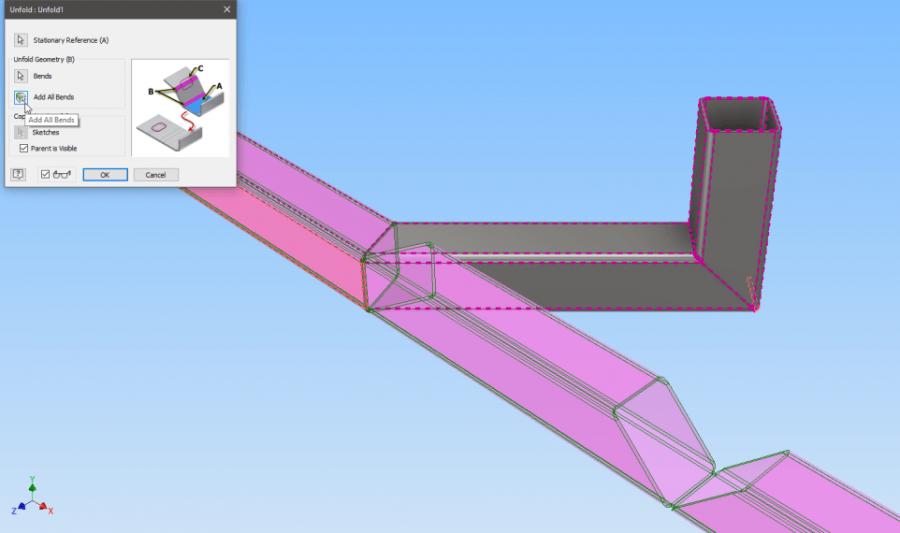
Unfolding the part pictured above

Being a fan of Frame Generator, I was keen to see if I could find a method that could be used to unfold an existing frame. In conjunction with an unlikely partner (Sheet Metal) it can! See the second method below for details.

Method 1 – Notch and bend using the “Bend Part” feature

This method assumes you can straighten the design in your head before modelling it and bending it into shape. If you have the brain for that process, then this is the method for you because it’s quick and easy. If you’d prefer to model the final result and then “unfold” it, skip over to Method 2 below.

Depending on your preference for modelling steelwork, this might appeal because it uses standard sketch-based features on the part file itself. I like it for its simplicity, but for multiple bends, it can quickly become difficult to calculate exactly where the cuts should be made, especially if the part is bent in more than one plane.

Continue to read the  the full article here |  Monday June 26,  2017   |||

Published in CADPRO SYSTEMS
Tagged under
  • cadpro systems
  • msc reporting
  • Software
  • Engineering
  • Manufacturing
  • productive sector news

Related items

  • Metal or wooden construction submissions welcomed by 21 Dec
  • Former Kiwi Olympian designing sustainable bags inspired by New Zealand's landscape
  • Engineers call for practical action on climate change
  • Free Design Guide - Markforged
  • Autonomous vehicle wins Industry Choice Award at Ara’s Engineering Showcase
More in this category: « CADPRO Systems connect down south HP Notebook Computer Battery Safety Recall »
back to top

Palace of the Alhambra Spain

Palace of the Alhambra, Spain

By: Charles Nathaniel Worsley (1862-1923)

From the collection of Sir Heaton Rhodes

Oil on canvas - 118cm x 162cm

Valued $12,000 - $18,000

Offers invited over $9,000

Contact:  Henry Newrick – (+64 ) 27 471 2242

Henry@HeritageArtNZ.com


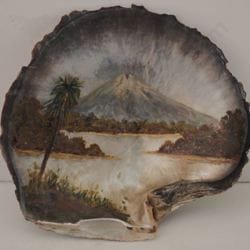
Mount Egmont with Lake

Mount Egmont with Lake 

By: John Philemon Backhouse (1845-1908)

Oil on Sea Shell - 13cm x 14cm

Valued $2,000-$3,000

Offers invited over $1,500

Contact:  Henry Newrick – (+64 ) 27 471 2242

Henry@HeritageArtNZ.com

MSC NewsWire is a gathering place for information on the productive sector in New Zealand focusing on Manufacturing, Productive Engineering and Process Manufacturing

  • Home
  • Global Presswire
  • Industry Organisations
  • National Press Club
  • Disclaimer
  • About Us
  • Pricing
  • Sitemap
Copyright © 2025 MSC NewsWire. All Rights Reserved.
Site Built & Hosted by iSystems Limited
Top
Trade Talk